Check out the ‘All Components’ column in the All Contracts table. It loops over a list and pulls information from multiple fields (some from another table)
https://templates.getgrist.com/gZmzYoGdS6b1/Custom-Product-Builder/p/11
The formula used here is:
'\n'.join(sorted(
  "{} — {:g} {}".format(comp.Component, quantity, comp.Unit)
  for (comp, quantity) in $Components.items()
))
We are using the join() method, sorted() function and format() method method all in one!
''.join() joins each item in the list.
'\n' adds a new line between each item in the list.
sorted() sorts the items in the list alphabetically.
This leaves us with the following:
"{} — {:g} {}".format(comp.Component, quantity, comp.Unit)
  for (comp, quantity) in $Components.items()
We’ll work through this backwards. First, we need to take a look at the Components column which is a hidden column in the All Contracts table.
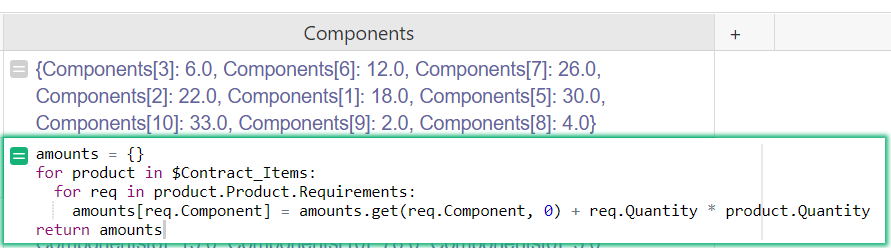
This column is a list of components and their associated quantities for the contract. In the for loop, we assign each item in the list of components two variables, comp and quantity. For Components[3]: 6.0 , comp = Components[3] and quantity = 6.0 . Components[#] specifies a Component in the Components table by Row ID. Components[3] is the component assigned 3 as it’s row id.
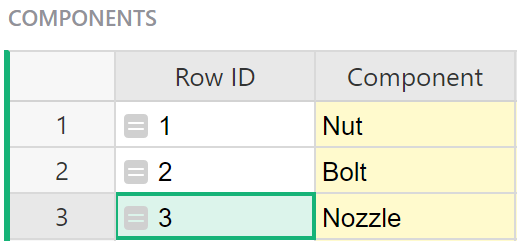
Now, we run each item from the list above through the equation "{} — {:g} {}".format(comp.Component, quantity, comp.Unit) .
comp.Component replaces the first set of {} . comp is the variable with our component ID so comp.Component finds the value in the Component column associated with that row ID. For Components[3] , comp.Component is Nozzle.
quantity replaces the second set of {} . Again, the quantity is the second variable in our list. For Components[3]: 6.0 , quantity is 6.0 . Our second set of {} are not empty. They include :g . This converts the value to a floating-point number.
comp.Unit replaces the last set of {} . comp is the variable with our component ID so comp.Unit finds the value in the Unit column associated with that row ID. For Components[3] , comp.Unit is None .
This formula is a bit in-depth so if you need assistance writing your own, you can share your document with support@getgrist.com and let us know what you need the formula to do and we’d be happy to help out!