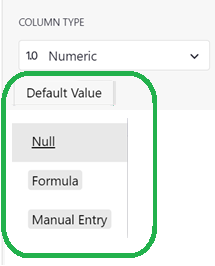
I’d like to suggest a feature for Grist: the ability to set custom default values for columns. Currently, when adding a numeric column, the default value is automatically set to 0, and there doesn’t seem to be a way to change this.
In some cases, it would be preferable to leave the default as null instead of 0. This allows users to distinguish between an intentionally entered 0 and an empty value that hasn’t been filled in yet. Having the option to configure default values would make column setup more flexible and user-friendly. Screenshot below is a quick mockup.
Good to know that default values can be set but I think setting the default value of a numeric column should be Null instead of 0. I’ve read the discussion links that nick posted so good to know this has already come up.
Agreed. From a database perspective, None/Null is the correct value for an uninitialized field (number, boolean, string, date, or WHATEVER.) Having to initialize a field to “no value” to avoid “lying” to the database by implying that you know the value for a particular field is 0 (or false, or midnight, or whatever, doesn’t feel right.
I would love to see this fixed. If there’s a real concern about changing the behavior for existing customers, I’d support a parameter under “Document Settings” for “Use None for uninitialized fields?” that defaults to False for existing databases but true for new ones?
That’s true but the problem with it is that trigger formulas can’t properly differentiate between “new record” and “changed” events. If I create a record, the value in the trigger formula will be None. If I clear a field by pressing the delete key on it, the exact same thing results. What if I want to initialize a cell to a certain value upon creation but also allow users to clear it by pressing ‘delete’ later on?
Suggestion: Would it be too much hassle just to introduce a new variable into the trigger formula’s scope called, say, is_new_record? That would solve the problem immediately.
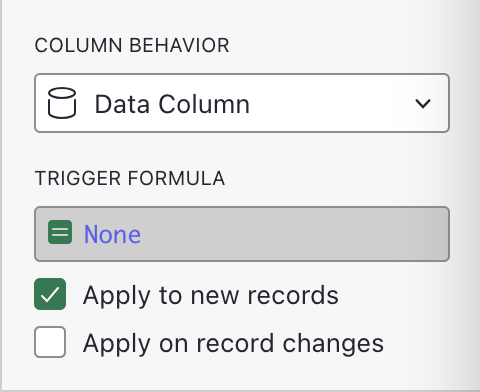
It sounds like you told the trigger formula to apply on record changes. If you tell it to apply only to new records, it’ll function as a default value, and will not interfere with cell edits.
I tend to use, as Dmitry suggests, a trigger formula for this. My go-to is: value if value else [what you want the default value to be]'
For example, if you have numeric column and would prefer nothing to show up instead of 0, try value if value else None as a trigger formula and set apply to new records
I’m afraid that’s not quite what I meant. I’d like to have both, a default value for new records and a trigger formula to handle modifications later on. Currently the only way to get this is to set the trigger mode to “on record changes”, but then in the formula we’ve got no way to differentiate between the two situations.
I agree with you that this is a limitation; I also need an initialisation formula that trigger on certain changes, but I also would like to start with an empty cell when creating new rows, so I can’t used the trick above (value if value else None, otherwise it will replace my 0 values with None)