I’ve been building a custom widget that reproduces Grist’s conditional formatting behavior by reading the boolean values from the automatically generated gristHelper_ConditionalRule* columns.
Each of these helper columns evaluates, for each record, whether its respective rule is true or false, and the widget then applies the corresponding color/style from widgetOptions.rulesOptions.
How I arrived at the issue
Initially, on my custom widget, I noticed all my risk records were displaying the same color formatting for the Current Risk Rating. A rating of 15 which should show orange was showing blue (like a rating of 1)
But on Grist’s standard widgets (cards, table, etc) the rating of 15 correctly displayed orange. So I needed to investigate.
My column Grau_de_Risco_Atual, which has multiple conditional formatting rules linked to $CalcRiskAtual, for example:
| Rule | Expression | Example color |
|---|---|---|
| 1 | $CalcRiskAtual == 0 |
white |
| 2 | $CalcRiskAtual > 0 |
blue |
| 3 | $CalcRiskAtual >= 3 |
green |
| 4 | $CalcRiskAtual >= 6 |
yellow |
| 5 | $CalcRiskAtual >= 12 |
orange |
| 6 | $CalcRiskAtual >= 20 |
red |
For a record where $CalcRiskAtual = 15, the helper columns evaluate as:
gristHelper_ConditionalRule   = $CalcRiskAtual==0     → false
gristHelper_ConditionalRule2  = $CalcRiskAtual>0      → true
gristHelper_ConditionalRule3  = $CalcRiskAtual>=3     → true
gristHelper_ConditionalRule10 = $CalcRiskAtual>=6     → true
gristHelper_ConditionalRule11 = $CalcRiskAtual>=12    → true
gristHelper_ConditionalRule12 = $CalcRiskAtual>=20    → false
So several rules are true simultaneously.
My widget initially picked the first (>0), while Grist itself used the last (>=12).
That part made sense — Grist probably overrides as it goes through the list.
Then I did a new test to confirm:
-
I changed the first rule from
==0to==15and gave it a distinct color (different font and background). -
Suddenly, in Grist’s native UI (not my widget), only the font color of rows where
$CalcRiskAtual = 15changed — not the background. -
When I changed the color of the last true rule (
>=12), it affected only the background color.
So Grist itself seems to combine both:
-
Font color from the first true condition, and
-
Background color from the last true condition.
This mixing happens inside the official Grist table/card renderers, not just my custom widget. (my custom widget is still showing blue for every record, and I am still debugging it)
It looks like Grist merges multiple true rules this way:
| Style property | Priority rule | Notes |
|---|---|---|
textColor |
first true rule | first non-null textColor is kept |
fillColor |
last true rule | last non-null fillColor overrides previous |
bold, italic |
merged (OR) | any rule setting true keeps it true |
This would explain why $CalcRiskAtual = 15 produced white text (from ==15) on an orange background (from >=12). (and when I changed the >=12 background to green with red text, it changed on the cell, while the text remained white as per the first true rule (==15))
Question
Is this mixing behavior (first textColor + last fillColor) intentional, or is it an unintended side effect of how Grist merges conditional formatting rules internally?
If intentional, could the logic be documented (or ideally made configurable) so that developers implementing custom widgets can reproduce Grist’s conditional formatting behavior exactly?
The behavior seems even more erratic than I first realized.
Look at the top left… 15- Elevado in red font with orange background. The red font is the font color for the ==15 condition, while the >=12 has an orange background and dark green font.
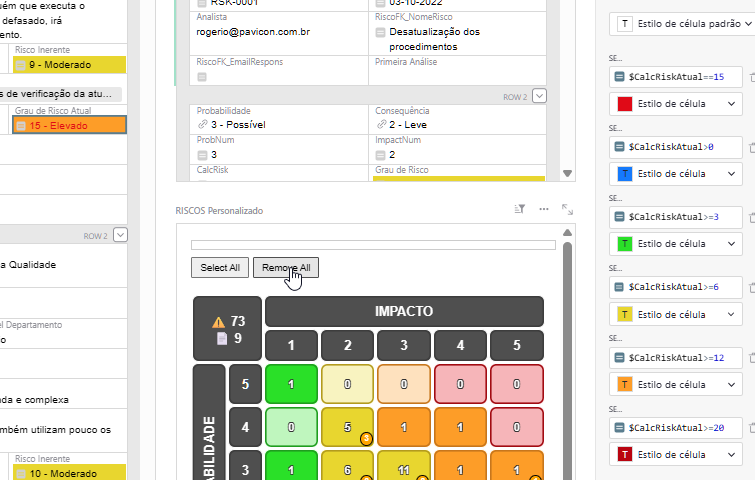
BUT THEN I changed the >=12 to a LIGHT green font and now the cell displays ONLY the >=12 formatting
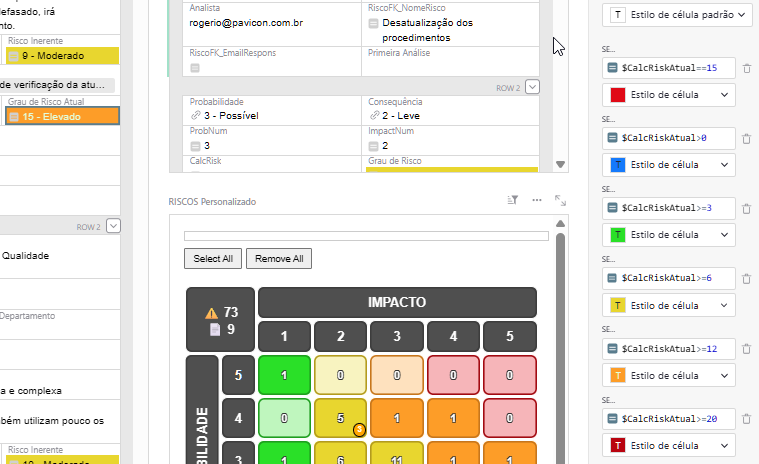
EDIT
OOOOOOH…. I see what is happening. Kinda.
I changed the >=12 to orange background and TRANSPARENT font color (white square with diagonal red line over it). It showed the font of the FIRST true condition. (==15)
Then I changed the >=12 to TRANSPARENT background… since >=6 is also true… and >=12 background was transparent, it showed YELLOW BACKGROUND!!!