New here, trying to create a sum of cells and feeling completely nOOb about it. Please help.
Hi! In Grist, the tool for that is Summary Tables: Summary tables - Grist Help Center. Is it what you are looking for?
Thanks - I did try understanding how to use Summary tables for this, but the results I got were confusing. I think the Grist learning curve is too much for me at the moment: I am really just looking for an alternative to Google Sheets, and have found that Proton Sheets is a more-direct alternative. I don’t know Python, and do not have the bandwidth to learn it for what I need this alternative for.  Long answer to a question you didn’t ask!
Grist is indeed different from Excel, and there is a learning curve. But people who get past it end up appreciating it more than Excel!
So, as a mild encouragement, try clicking “Add new” button, then “Add widget to page”, then the “𝚺” icon next to the table you’d like to have sums over.

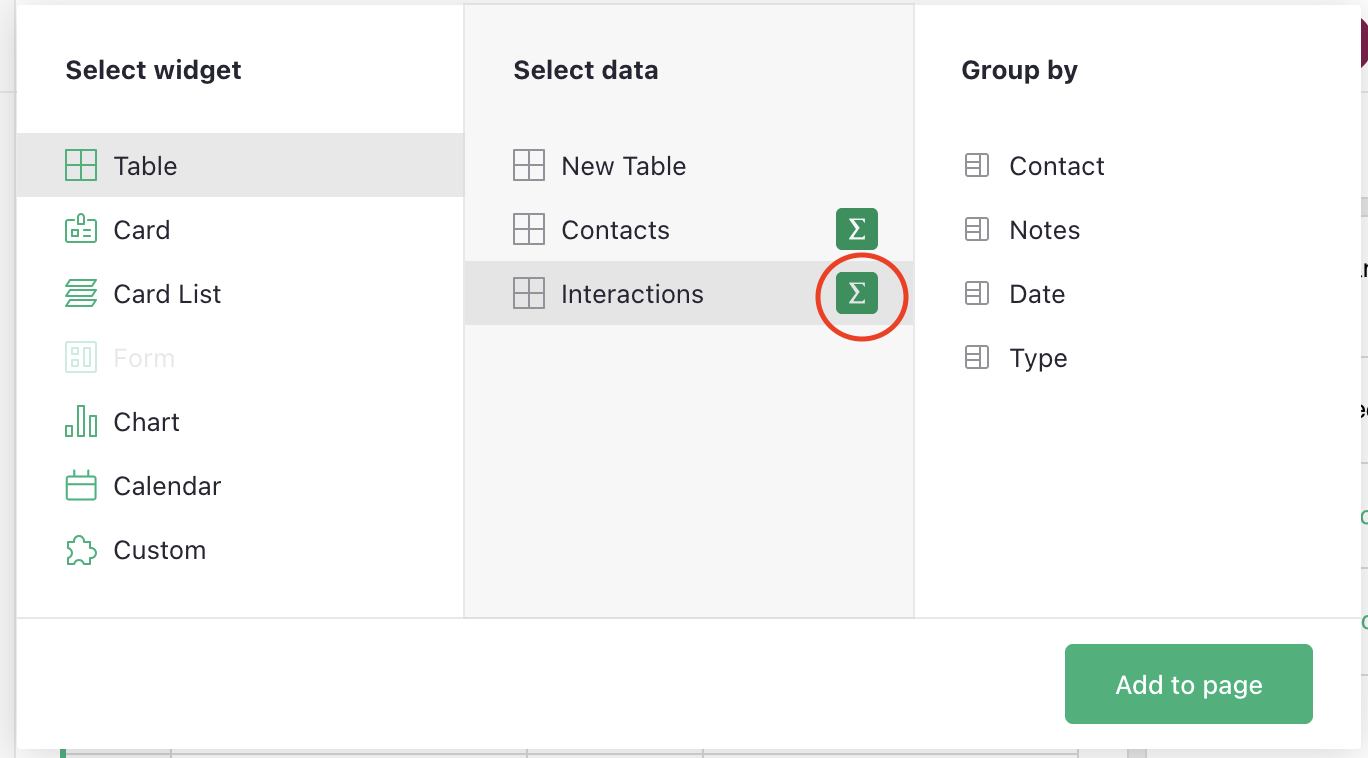
Then click “Add to page” and see what happens.
Normally, you get a widget on the page that has totals for all numeric columns in your data, which is often exactly what you want. And if not, each total is a formula like SUM($group.Amount) – so you can add other formulas like it, or change SUM to AVERAGE, etc. – not really harder than Excel, just different.
1 Like