I realized it’s still hard to find a working approach for how to create a column of auto-incrementing numbers using a formula. Here’s a solution that works, for reference, with each new year starting at 1 and auto-incrementing:
In this example, Year-Seq is filled to the next unused number for the current year.
- If you clear the Year, then Year-Seq is cleared too.
- If you change Year, then Year-Seq is reset to the next unused number for the new year.
- Category isn’t used for generating numbers, and only used to show how to create an identifier using multiple fields.
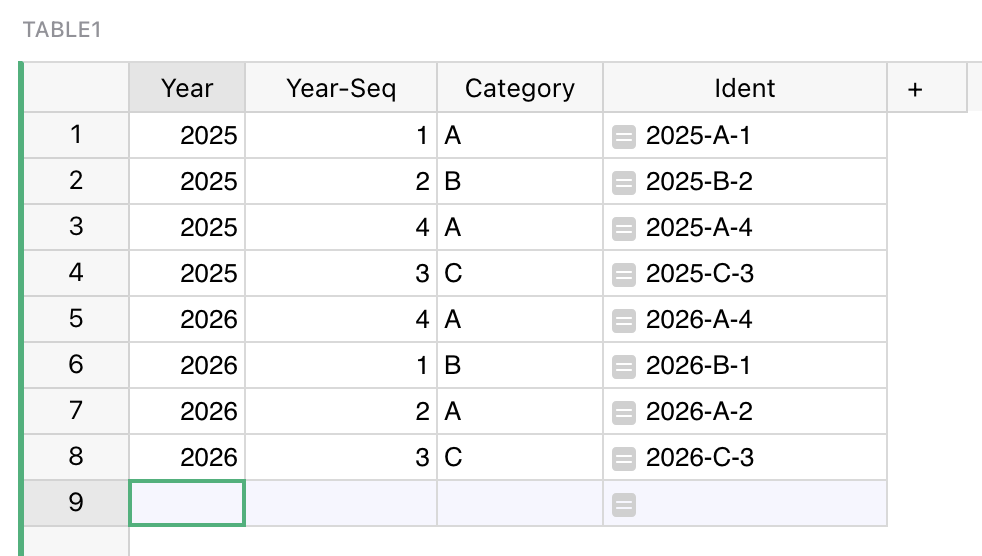
It intentionally shows the numbers out of order to illustrate how the next generated number will be the correct one regardless of the order shown.
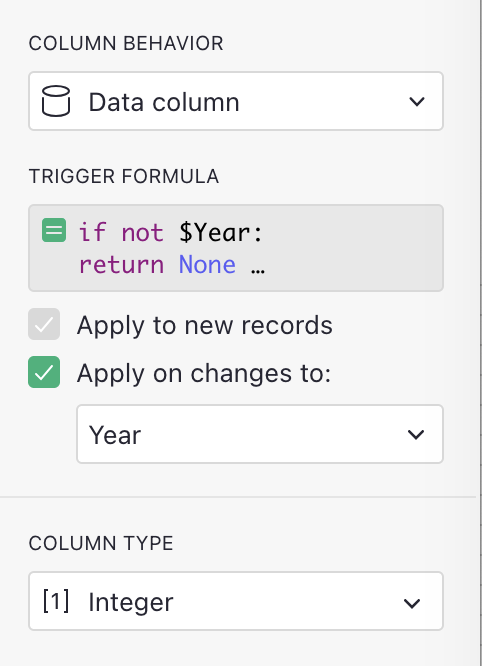
The magic is in the Trigger Formula for Year-Seq column. It’s type is “Integer”. It’s trigger formula is:
if not $Year:
  return None
records = Table1.lookupRecords(Year=$Year)
PEEK(MAX(r.Year_Seq for r in records if r.id != $id)) + 1
And it’s set to trigger for new records and for changes to Year.
This should work for any kind of auto-incrementing with grouping (in this case by year, but could be anything). If you want it without grouping, you can replace Table1.lookupRecords(Year=$Year) with Table1.lookupRecords() without arguments; but for such cases, just using the existing $id is often sufficient – the built-in $id column is a unique numeric identifier that every Grist row has, and it’s simply an auto-incrementing integer.
This trigger formula uses a couple of tricks:
- Checking if Year is set allows it to clear the number when the year is cleared.
lookupRecordsis the usual lookup, and it does not useorder_by="Year_Seq". Ordering seems appropriate, but it couldn’t work because the result goes into the Year_Seq column, creating a circular reference. Also do NOT try to fix that by puttingPEEK()around a lookup: this will break dependency tracking until you reload the data engine for your document.- It is, however, OK to put
PEEK()around the result of the lookup. Why it’s needed… I have trouble explaining too It has to do with making it work when you add multiple rows at once, e.g. via pasting.
 - The last line takes the max of Year_Seq of all the other records for the year (except the current one). Then it adds 1 to produce the new value.
This is the most reliable solution I’ve found for generating sequential ids within a group.