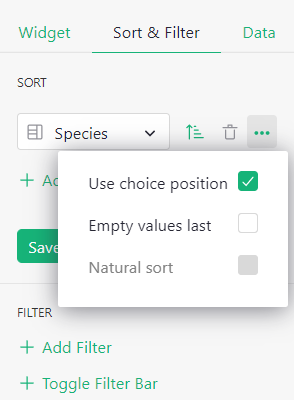
When sorting a Choice column, it’d be great if we can sort by the label order (assigned by the user), not just alphabetically.
Ooh, makes sense! Thanks for sharing the idea.
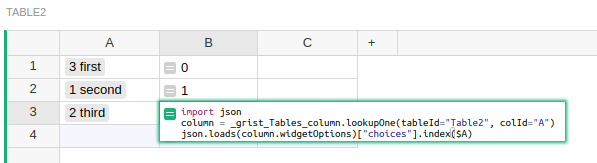
You can do this by hacking into Grist with an extra formula like this:
import json
column = _grist_Tables_column.lookupOne(tableId="Table2", colId="A")
json.loads(column.widgetOptions)["choices"].index($A)
This gives the position of $A within the choices of the column A in Table2, so you can sort by that.
Thanks, but somehow I can’t make it work…
Here’s a demo: Grist

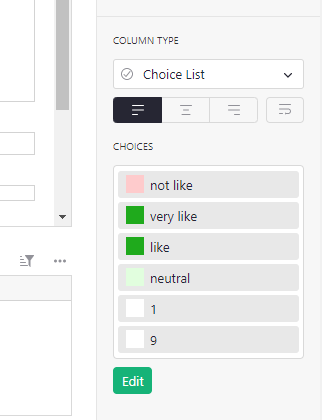
- The formula I gave will only work for Choice columns. A different formula is needed for Choice List columns. What do you need?
- The formula needs to be in a separate column from the Choice column. It returns a number which is the position of the choice. That’s the column to sort by. You’ve put the formula in the same column which means something different (Intro to formulas - Grist Help Center)
This is why I requested a feature that a layperson can use. Not a developer here… 
Update: @school
You can now sort a Choice column by the label order in the choice editor. When sorting a Choice column, click on the three dots to open a menu of additional features. “Use choice position” sorts by label order.