Hi,
I face a limitation in the display of the Document History. It started long ago, but I didn’t care that much until now as I would like to audit the history a little bit more.
I use version 0.3.6 of the Grist Desktop app (portable version).
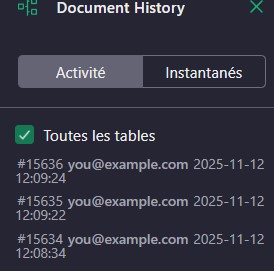
Modification events are identified but the details of the changed data (WAS/IS) are not displayed.
See the picture hereafter. In my environment, I’ve set GRIST_DESKTOP_AUTH=none and GRIST_PORT=8080, nothing else.
Any idea?
Thanks.
Hi @Pierre-Jean_Turpeau, thanks for reporting this. I tried Grist Desktop 0.3.6 and can’t immediately replicate the problem. Are you seeing this in a specific document, or all documents?
Ah yes good point, it works as expected when I try on a newly created document.
If I’m not wrong, it happened when I migrated from 0.2.10 to 0.3.0 so maybe something has changed in the underlying history model between 0.2x and 0.3.x ?
My problem is that the current .GRIST I use serves as a template and it is so rich that recreate it from scratch would be a nightmare… 
Maybe, one solution would be to hard copy/replace few tables from a newly created document?
Any idea?
@Pierre-Jean_Turpeau I assume your data is sensitive, so you cannot share the document? If you do:
Share menu → Duplicate document (selecting “As template” option)
Then does the document copy have the same problem? If so, is that document copy without rows something you’d be willing to share? Just trying to figure out a way to learn the cause of what you’re seeing.
I doubt fiddling with some tables would change things, but without your document it is hard to guess at what the problem might be.
Hi Paul, thank you for your help.
For now, both data and structure are sensitive. Anyway, I’ve expurged pretty much everything from my template and added a new Test Table in the attached sample.grist file.
At least in my environment I can still observe the undesired behaviour with this sample.
I hope this could help identify the root cause.
KR.
sample.grist (180 KB)
1 Like
Perfect, thanks for taking the time to do that @Pierre-Jean_Turpeau !
Quick update: it looks related to access rules. To view history, the viewing user needs full read access to the document, since the history can contain sensitive information and we don’t yet have a way to censor the history piece by piece.
@Pierre-Jean_Turpeau one way to see document activity is to give yourself clear read access to all tables, with a top-priority condition of something like user.Access in [OWNER]granting at least read access.
Another way is by removing access rules. Do you use them? You’re working with Grist Desktop right? That’s usually single user, though it is possible to use it multi-user.
1 Like
Thank you for the analysis.
I use the access rules to prototype checks and controls in the case of a true collaborative deployment. It’s not mandatory in Desktop mode.
I’ll look at updating the access rules.
Thanks a lot!
1 Like