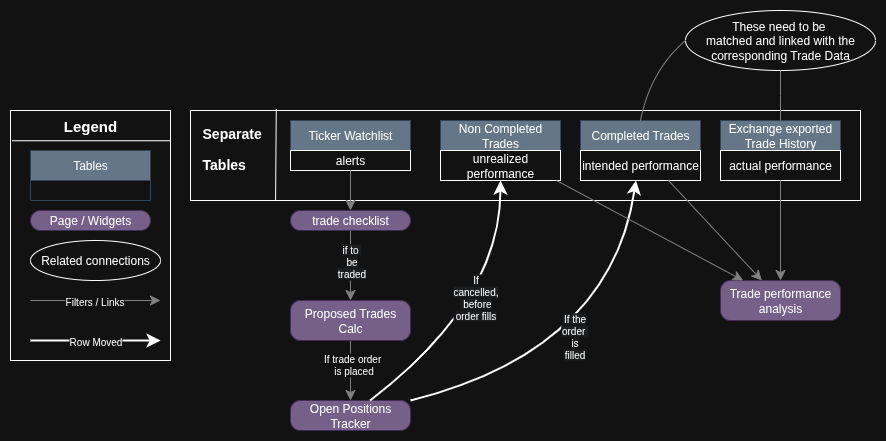
So I am new to Grist and I am trying to create a Investment/Trading calculator and journal.
I want to know is there a Grist way of moving a row of data between tables when its appropriate to do so, or am I thinking about this wrong in regards to the Grist database methodology?
It would be great if there was a toggle button or a conditional trigger that moved it to the next table when appropriate. Previously I would copy, paste the row to the appropriate sheet, but this was cumbersome and error prone.
Reason’s for multiple table’s:
- The rows of data in “Completed Trades“ and “Exchange exported Trade History“ need to be linked but not easily corroborated automatically
- Having the “Non Completed Trades“ separate helps me match the taken trades as described above. Plus they have a different workflow.
- There will be multiple instances of the same ticker/asset in each table at the same time. So I am considering how to distinguish them in a database way other than just visually in Excel. When I Update the “Exchange exported Trade History“ which is parsed by a python script, It assigns each holistic trade a “Trade_ID“ which I then manually associate with my manually tracked data.
- The “Ticker Watch list“ data is ephemeral until it moves to either of the next tables.
Have you tried the Action Button?
Thanks for the suggestion.
You mean the custom widget “Action Button”? I wasn’t aware of it, and will certainly check it out.
For completed/non-completed, I’d recommend keeping them in a single table, and creating separate pages/views filtered by status – they can show different columns and linked widgets, since you need to work with the two subsets differently. If you do it that way, “moving” a row would just require updating the status.
For “Trades” vs “Exchange exported Trade History”, since you are trying to keep them separate, that’s fine. But I think you wouldn’t need to move between one and the other, but mainly verify they match? If you need to move or copy rows, there is no great solution yet, but you can work around with Action Button (not properly documented, but there is some info here), or an external script (or integration like n8n) perhaps triggered by a webhook. But copy-pasting might be easiest.
I heed your recommendation on keeping completed/non-completed in a single table.
Thanks for providing clarity. I am trying to getting my bearings on how use the database methodology properly for my use-case. Before jumping in and attempting to force a clumsy workflow.
So much potential functionality with integrations that it makes one’s head spin somewhat, Thanks for building such a useful product