Hi,
I’m all new to Grist and trying to process the way it works. I think I’m starting to get around the notion of reference columns, but I’m trying to implement something which is proving difficult: a conditional dropdown with complex conditions.
I have a table for “Training sites”, according to work time and public / private sector. The associations go as follow:
TRAINING SITES
| Work time | Sector | Training site |
|---|---|---|
| Half-time | Public | INSPE |
| Half-time | Private | ISFEC |
| Full-time | Public | EAFC |
| Full-time | Private | ISFEC |
| Third of the time | Public, Private (2 possible choices for this one) | UNICE, UTLN (2 possible choices as well) |
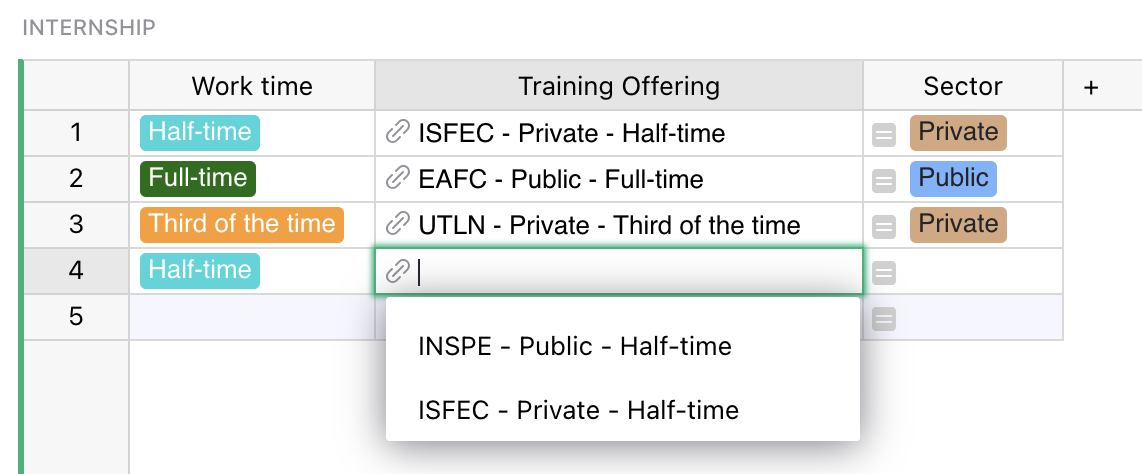
I’m referencing the column “Training Site” in another table (named “Internship”), in a column called “Training site” as well, and also have another column referencing work time , and tried to implement something along the lines of “choice.Work_time==$Work_time”), which yields “no choice matching conditions”.
TABLE INTERNSHIP
| Intern | Work time | Training site |
|---|---|---|
| Intern name | Referencing Training_sites.Work_time | Referencing Training_sites.Training_site |
| Problem: two possibilities for “full-time”, and two for “half-time” | Problem: no choice matching conditions |
What seems problematic to me right away is that, in my “Training sites” table, I’m creating two rows for full-time (one for public, one for private) and two rows for half-time (one for public, one for private), but then both full-time and both half-time come up as separate records, which is not the point (I get 4 records instead of just two possibilities), which bungles my references.
Any help would be much appreciated!
Thank you in advance,
Ari.