A simple custom widget to upload attachment:
https://grist.incubateur.anct.gouv.fr/o/tutos-templates/mfNg44qMCJGm/Ex-envoyer-un-email-avec-PJ/p/3
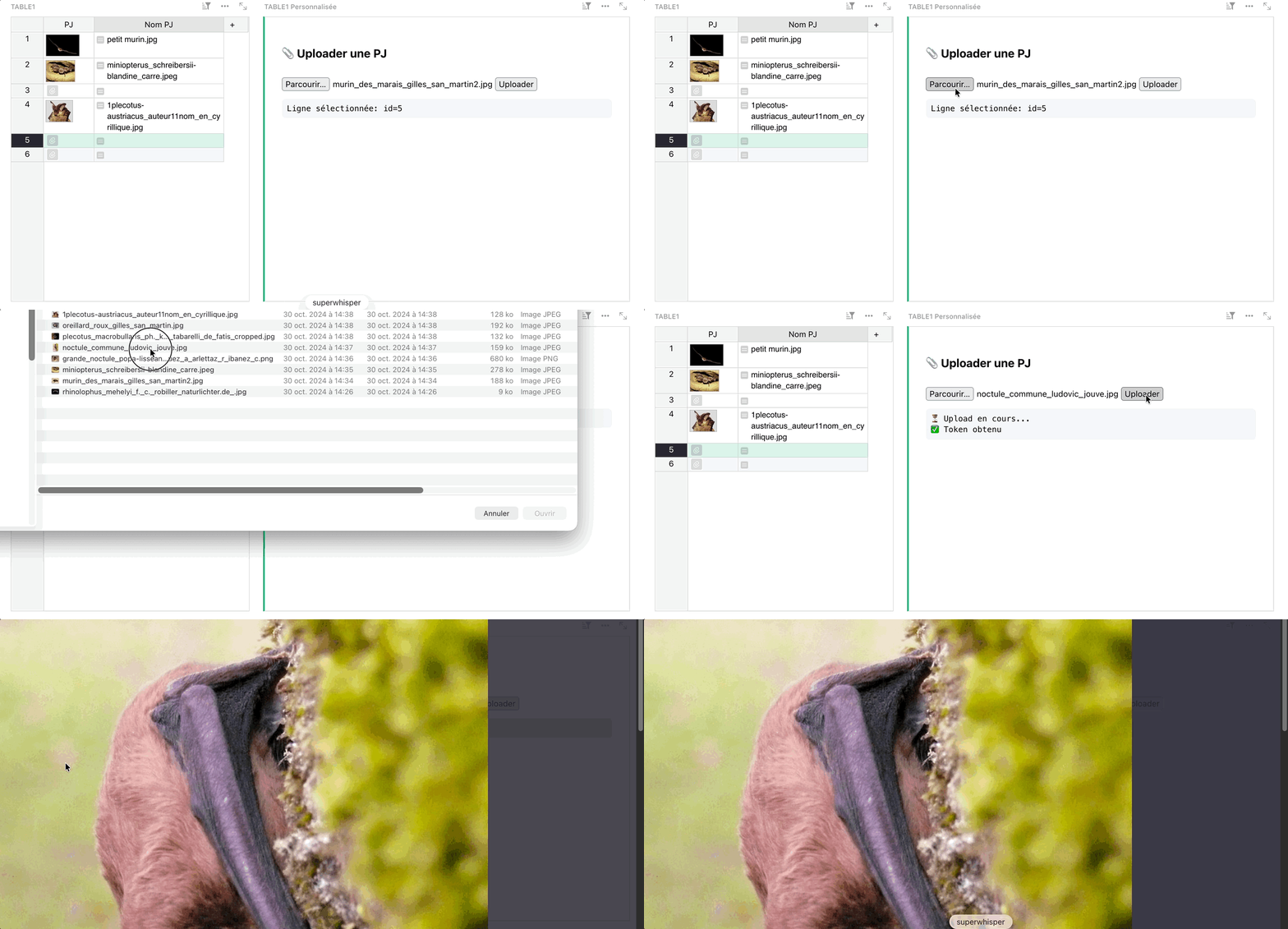
Here are the steps to upload an attachment to a table:
-
Retrieve the token
const tokenInfo = await grist.docApi.getAccessToken({ readOnly: false }); -
Make the API request to load the file (to store it, but it’s not currently linked to a table)
const formData = new FormData();

formData.append('upload', file, file.name);

const response = await fetch(`${tokenInfo.baseUrl}/attachments?auth=${tokenInfo.token}`, {

method: 'POST',

body: formData,

headers: {

"X-Requested-With": "XMLHttpRequest",

},

});
-
Retrieve existing attachments from the cell
const existingAttachments = currentRecord.PJ || []; -
Create the list including the new attachment
const newAttachmentsList = Array.isArray(existingAttachments)

? [...existingAttachments, attachmentId]

: [attachmentId];
- Update the cell with the new attachment
const table = await grist.getTable();

await table.update({
	d: currentRecord.id,
	fields: {
	PJ: ['L', ...newAttachmentsList]
	      }
	});
The full code below:
<!doctype html>
<html lang="fr">
	<head>
		<meta charset="utf-8"/>
		<script src="https://docs.getgrist.com/grist-plugin-api.js"></script>
		<style>
			body {
				font-family: system-ui;
				padding: 20px;
			}
			button, input {
				margin-top: 8px;
			}
			pre {
				background: #f6f8fa;
				padding: 8px;
				border-radius: 6px;
				white-space: pre-wrap;
			}
		</style>
	</head>
	<body>
		<h3>📎 Uploader une PJ</h3>
		<input type="file" id="fileInput" />
		<button id="uploadBtn">Uploader</button>
		<pre id="log">En attente...</pre>

		<script>
			const log = document.getElementById('log');
			const fileInput = document.getElementById('fileInput');
			const uploadBtn = document.getElementById('uploadBtn');

			let currentRecord = null;
			let tableId = null;

			// Initialiser Grist
			grist.ready({ requiredAccess: 'full', columns: [{ name: 'Attachments', type: 'Attachments' }] });

			// Récupérer la ligne sélectionnée
			grist.onRecord((record, mappings) => {
				currentRecord = record;
				log.textContent = `Ligne sélectionnée: id=${record.id}`;
			});

			console.log("uploadBtn", uploadBtn);
			uploadBtn.addEventListener('click', async () => {

				const file = fileInput.files[0];

				if (!file) {
					log.textContent = '❌ Sélectionne un fichier';
					return;
				}

				if (!currentRecord) {
					log.textContent = '❌ Sélectionne une ligne dans Grist';
					return;
				}

				try {
					log.textContent = '⏳ Upload en cours...';

					// 1. Récupérer un access token (avec droits d'écriture)
					const tokenInfo = await grist.docApi.getAccessToken({ readOnly: false });
					log.textContent += `\n✅ Token obtenu`;

					// 2. Uploader le fichier via l'API REST
					const formData = new FormData();
					formData.append('upload', file, file.name);

					const response = await fetch(`${tokenInfo.baseUrl}/attachments?auth=${tokenInfo.token}`, {
						method: 'POST',
						body: formData,
						headers: {
          		"X-Requested-With": "XMLHttpRequest",
    				},
					});

					if (!response.ok) {
						throw new Error(`Upload échoué: ${response.status} ${response.statusText}`);
					}

					const result = await response.json();
					const attachmentId = result[0];
					log.textContent += `\n✅ Fichier uploadé, id=${attachmentId}`;

					// 3. Récupérer les PJs existantes de la cellule
					const existingAttachments = currentRecord.PJ || [];
					// Grist stocke les attachments sous forme ['L', id1, id2, ...]
					// Mais onRecord les renvoie déjà décodés en array
					const newAttachmentsList = Array.isArray(existingAttachments)
						? [...existingAttachments, attachmentId]
						: [attachmentId];

					// 4. Mettre à jour la cellule avec la nouvelle PJ
					const table = await grist.getTable();
					await table.update({
						id: currentRecord.id,
						fields: {
							PJ: ['L', ...newAttachmentsList]
						}
					});

					log.textContent += `\n✅ Attachment lié à la ligne ${currentRecord.id}`;
					log.textContent += `\n\n🎉 Terminé !`;

				} catch (err) {
					log.textContent += `\n❌ Erreur: ${err.message}`;
					console.error(err);
				}
			});
		</script>
	</body>
</html>