Showcase: Invoice Studio — an invoicing and e‑invoice widget for Grist by Anupress

Hello everyone :waving_hand:

Advanced Charts has an invoice block that prints one row as a document. People kept asking it for things a block has no business doing, so I pulled it out and spent the summer on it properly. Invoice Studio — a free, open‑source widget that turns the tables you already keep into invoices, quotes, receipts and statements, and gets them sent.

Live demo (no install, no Grist needed):
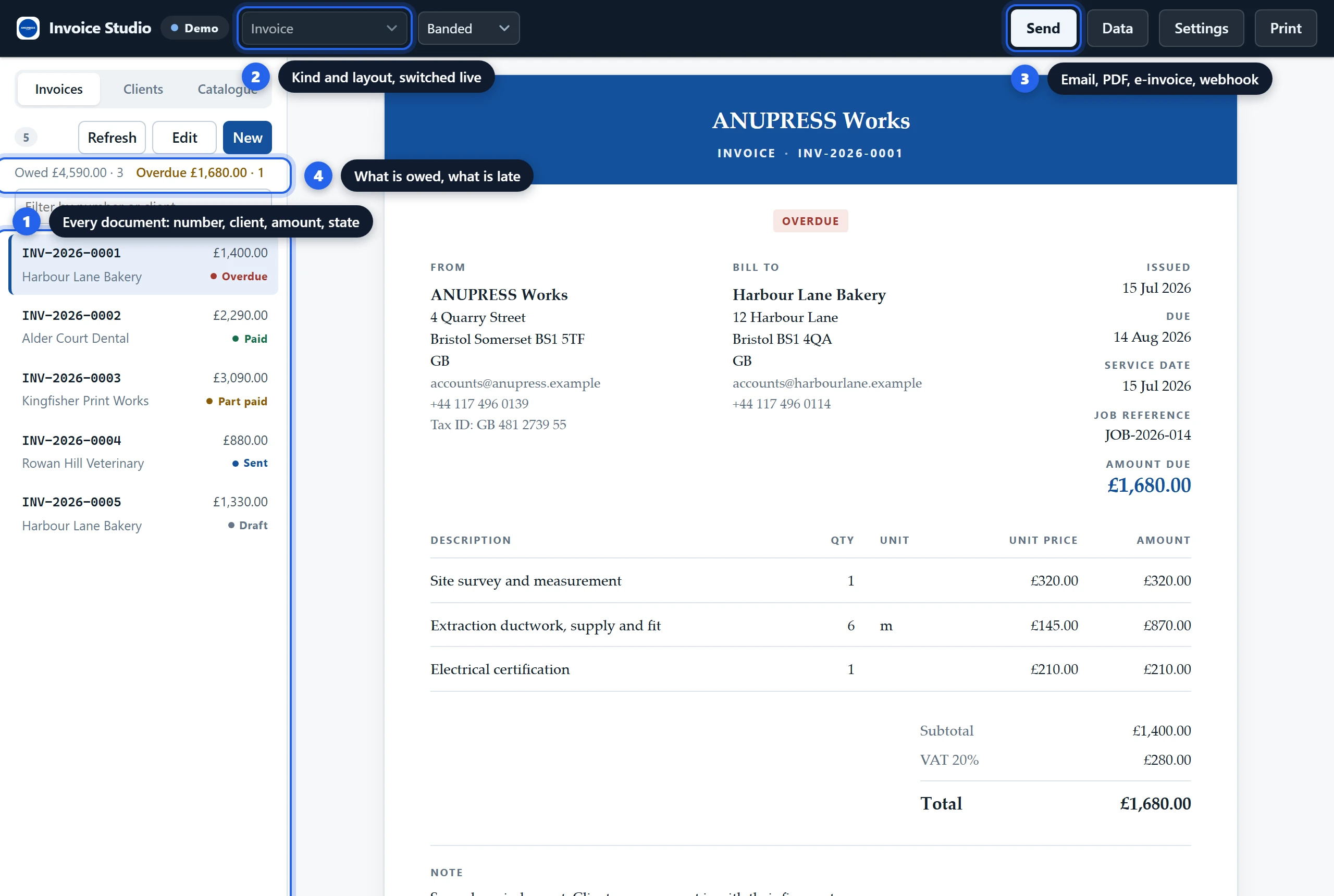
That one is a builder. Swap construction for restaurant, legal, saas, nonprofit or any of the other trades and you get that whole sample business, wording and numbering and tax settings included. All fourteen side by side.

Use it in Grist → add a Custom widget, paste this URL, set Access to Full document access:
https://anupress.github.io/grist-invoice-studio/

What it does

  • Reads four tables — clients, products, invoices, line items — and works out which is which from your column names. Grist’s own Invoicing template needs no setup at all. If your names are unusual you point it at the right table and column once, in the Data drawer, and a client column called Kunde is then perfectly fine.
  • Eight document kinds out of one table. Invoice, proforma, quote, receipt, credit note, statement, delivery note, packing slip. Each behaves as itself: a quote carries a valid‑until date and no bank details, so nobody can pay it by accident.
  • Tax by country — one rate or a rate table, the EU reverse charge from the two addresses and the VAT number, the §19 UStG sentence and its equivalents, CGST/SGST for India.
  • The client’s language, set once on their record. A French client gets a Facture, a German one a Rechnung, and nobody picks per invoice. Eight languages.
  • The PDF writer is mine, not a library’s. Font subsets go in only when a page actually needs them, so a plain invoice is about 6 KB. Payment QR codes as well: EPC/SEPA, UPI, or your own link. Scripts the embedded font doesn’t cover, Chinese and Arabic and Devanagari, still come out as boxes. That one is on me.
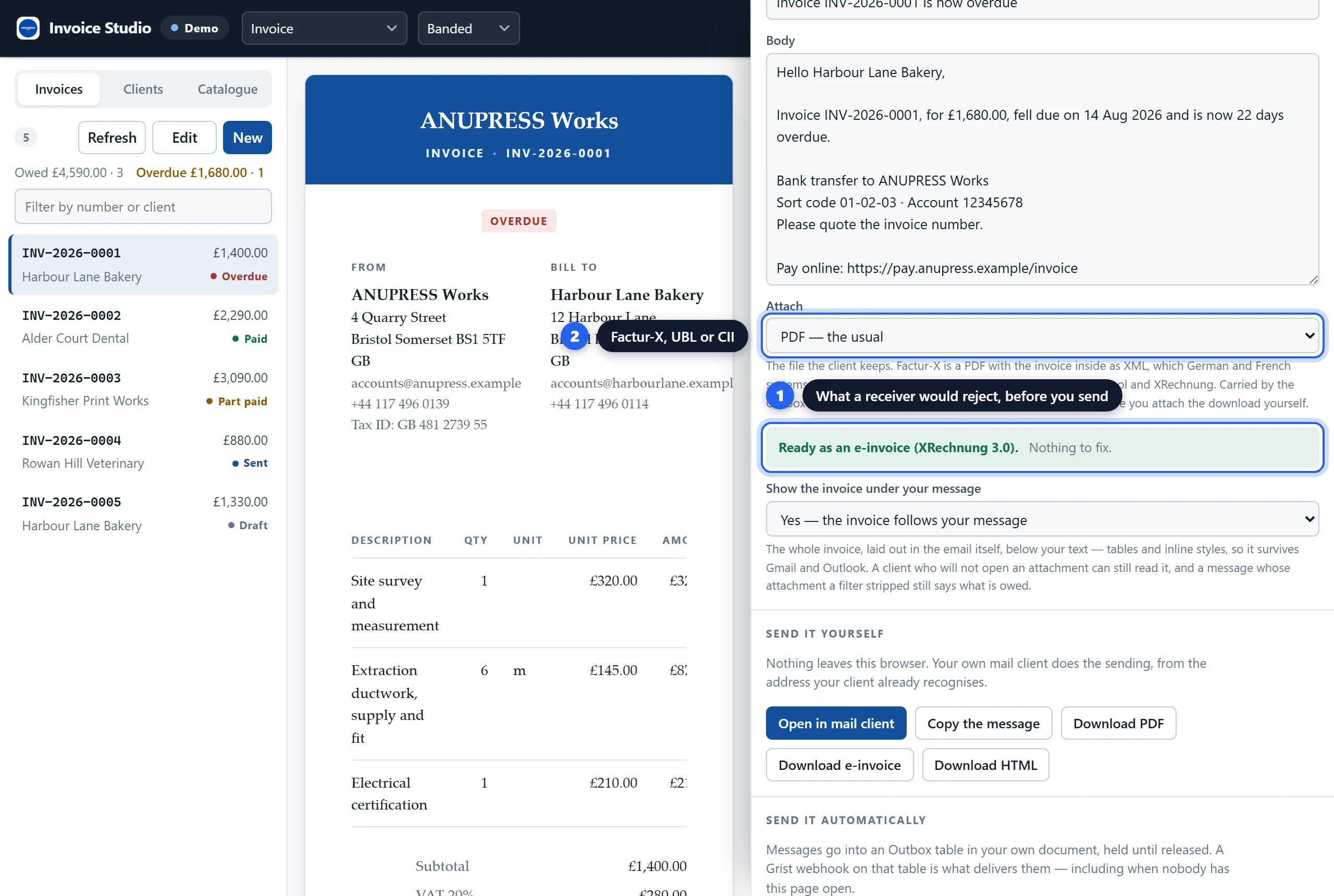
  • E‑invoices — Factur‑X, UBL and CII, on EN 16931, XRechnung 3.0 or Peppol BIS 3.0. This was the part I was least sure of, so every output now goes through the official KoSIT validator, Peppol’s own Schematron and Mustang before a release. All three accept them. In the widget, a check before each send says what the profile is still missing.
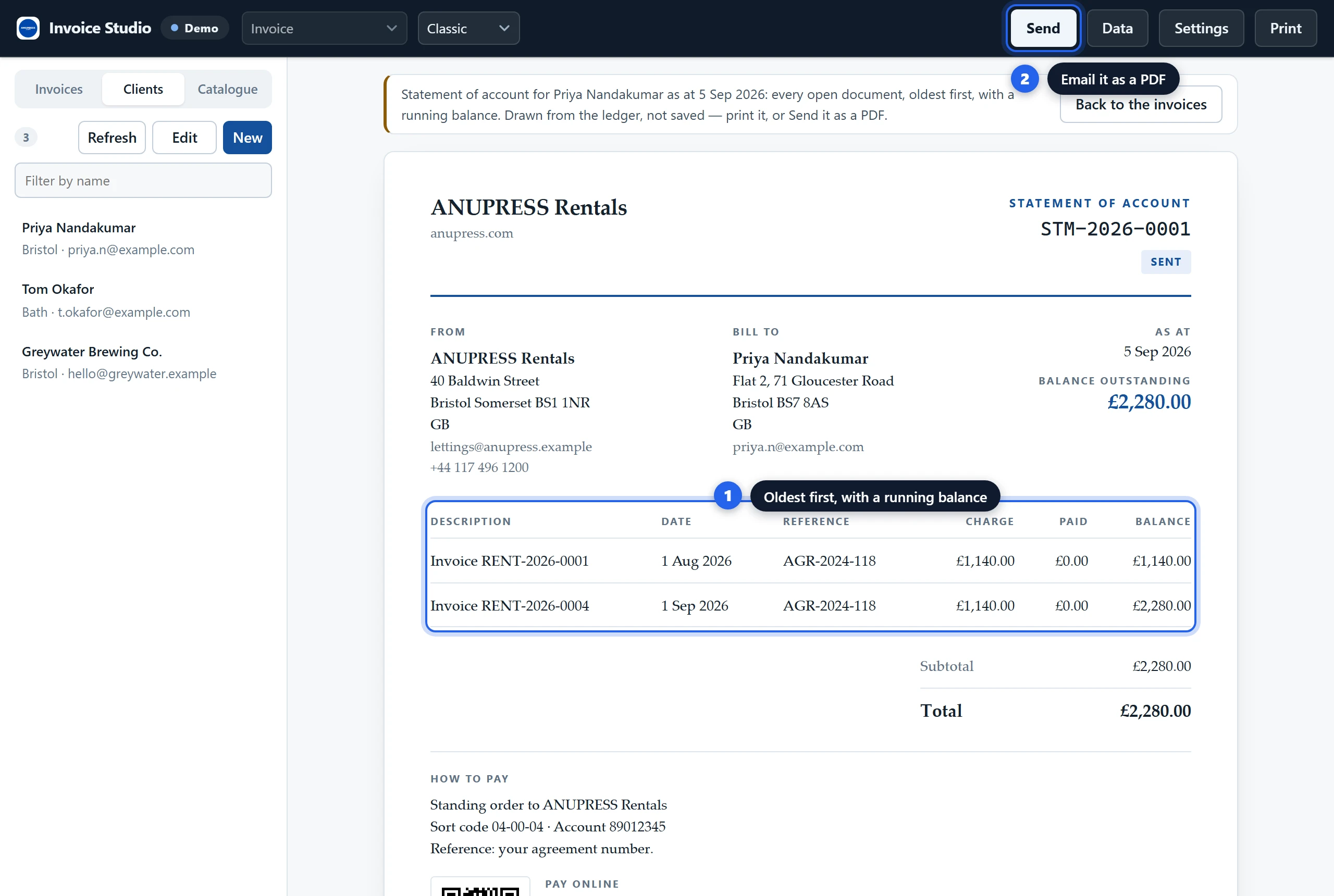
  • The month after the invoice. Raise the same document again for next month, add a line of interest for the days overdue, or draw up a statement of everything a client still owes, oldest first.
Sending

It can’t send the email itself. A web page has no mail server. So it writes the message and hands it on four ways: your mail client, a formatted copy with the invoice laid out underneath, an Outbox table for a Grist webhook to deliver, or a POST to an endpoint you run. Only the last one leaves the browser, and it goes to a URL you typed in.

Privacy

No ANUPRESS server, so there is nowhere for anything to go. It does want full document access, which I would hesitate over myself, so here is all of it. It reads four tables at once, and below full access Grist won’t list a document’s tables at all, which makes a document full of invoices look exactly like an empty one. It writes invoice and line rows when you save, adds a column when a field has nowhere to live (a status, a paid date, a client email), stores a catalogue picture as an attachment, keeps its own settings, and writes Outbox rows if you use that route. It never renames or removes anything. I would still try it on a copy first.

Guide and repo

I wrote the whole thing up, every screen and setting, with CSV files carrying the right headers for bringing your clients and products over from a spreadsheet or another tool. Grist Invoice Widget: 100% Free Invoices & E-Invoices - ANUPRESS

Source: GitHub - anupress/grist-invoice-studio: Grist custom widget: invoices, quotes, receipts, credit notes, statements and e-invoices (XRechnung, Factur-X, UBL) from the tables you already keep. PDF, payment QR codes, 8 languages, tax by country. Runs in the browser, no server. Free, MIT. · GitHub (MIT). Self‑hosted Grist can list both ANUPRESS widgets in the Custom widget picker with nothing to paste: set GRIST_WIDGET_LIST_URL to https://anupress.github.io/grist-invoice-studio/manifest.json.

What I’d love feedback on

  1. Point it at a document that already has invoices in it. Did it read your tables, or did you have to describe them in the Data drawer?
  2. Which e‑invoice profile do your customers actually ask you for, if any yet?
  3. Would you use the Outbox and webhook route? If anyone would, I’ll write it up as a proper recipe rather than the paragraph it gets now.
  4. Which trade is missing?

And one for anyone from Grist Labs: the gallery README doesn’t say whether externally hosted widgets can be listed, and every entry in it today lives inside the repository. Would a pull request adding a folder with the built widget be the way in, or is an external URL fine?

Thanks for taking a look — happy to answer questions or take PRs.
— Anupress Team

2 Likes

This is really awesome.

I have a side-request: could you share your workflow to get this functionality implemented?

It seems you’ve used AI, but don’t want to assume :slight_smile:

Would be good to know for replicability!

thanks!

1 Like

Hello @Nico_Pace,

Thanks, glad you liked it.

Yes, I have used AI.

I do the research and brainstorming first. Once I’m happy with my initial draft, I use AI to write the code fast. Then, after a lot of revisions and testing, AI rewrites my drafts into something postable, and when I finally feel it’s ready, I publish the tutorial post on our website and showcase it here.

If you have any more questions, feel free to ask!

Thanks for your answer.

I guess my follow-up question is in regards of structured prompting, skills, or tools you might be using for this.

I think there is not enough written about this workflow, and the more we share, the more we find the right abstractions and methods to learn together.

Thanks for sharing!!

1 Like

Fair question, and I’ll admit part of it I can’t show: my own notes and sketches after the research, way too messy to post anywhere. Just scribbles while I work out what a real invoice needs by trade and which rules actually apply.

Once that’s sorted in my head, I feed it all to Claude, mostly Opus 4.7 through Claude Code, and keep going back and forth until it actually gets what I’m after. That part is most of the real work, honestly! Once I’m happy with the plan, coding starts phase by phase rather than all at once, so a wrong turn gets caught early instead of after everything’s built on top of it.

The rest is checking rather than trusting. Every e-invoice file goes through the real KoSIT and Peppol validators before I call it valid, and the test suite runs before every release. I hope it helps!

Yesterday I had a realization. I created a local setup with Grist desktop:

I got the API key and pass it on to OpenCode. I have an OpenCode Go subscription (5usd/month).

Asked Muse Spark 1.3 model to connect through local MCP using GitHub - gwhthompson/grist-mcp-server · GitHub and also the Py_grist_api Python library and it is working.

I can prompt the Agent and it creates widgets as well as grist tables and we can talk both in terms of grist structures and in terms of widget structures is pretty amazing and pretty straightforward.

It is also EXTREMELY quick… I can iterate in 1min iterations with full widgets created. Prototypes of course… but a clear base to explore interaction options before settling in the widgets that are needed.

2 Likes

Hey Anupress,

thanks for your work. Your widget really offers a lot in terms of functionality and structure. I was thinking to create one myself, but wouldn’t have known where to even start. Especially electronic invoices are a real headache for me.

Currently, I try to determine if it has all the basics we need for day to day business. Three questions so far:

  • Is it possible to change the layout more fundamentally? We are a german company and usually our invoices are structured in a layout called DIN 5008. Your templates look nice but if it doesn’t fit in our standard envelopes, we can´t use it.
  • Our invoice numbers include the account number of our ledger (maybe not best practice but it is what it is). Is it possible to include custom data rows in the numbering structure or use custom rows in general? Our Accounting needs to have every invoice connected with a ledger.
    I already have formulas in Grist that create the numbering system. The question would be, if we can access it when creating a new invoice with the widget.
  • Filtering & Sorting: I imported multiple years of old invoices into Grist, to get a better feel for what we need. Within the widget itself, that becomes quickly overwhelming. I created an invoice for testing purposes and found it at the very bottom of the invoice list (999+). I don’t fully know yet what options for filtering and sorting would really be needed, but could “last created” be added?
    Also, when I select an invoice at the bottom, I have to scroll back again to the top. I think the position of the invoice display should be independent of the selection list.

Hey @Till,

Thanks for writing this up so clearly. It took a couple of days because I built all three points into the widget rather than describing workarounds. If you still see the old version, reload the page.

1. DIN 5008
There are two new layouts, “DIN 5008 (Form B)” and “DIN 5008 (Form A)”. Pick one in Settings → Document → Layout, or try them from the layout menu in the top bar. The address field sits where the standard puts it: 20 mm from the left edge, 45 mm from the top on Form B (27 mm on Form A), 85 × 45 mm, with your return address in small type above the recipient. The information block at 125 mm holds the invoice number, the dates, the client’s reference and, where it applies, their VAT ID. Fold marks and the punch mark are on the left edge. Your logo and name sit at the top right, and your address, tax number and legal line move to a three-column footer.

German addresses are now written postcode first (“10115 Berlin”). On these layouts the lines are numbered, and the totals are marked netto and brutto when the invoice is in German.

The PDF download is the most exact version. Could you print one at 100% (not “fit to page”) and hold it against one of your window envelopes? If anything is off for your envelopes, tell me and I’ll adjust it. The layout is explained with a picture here: Grist Invoice Widget: 100% Free Invoices & E-Invoices - ANUPRESS

2. Invoice numbers with the ledger account
Two ways, whichever suits you better:

  • Keep your Grist formulas. If the number column in your invoice table is a formula, the widget now leaves numbering to Grist. The number field in the editor is read-only, and your formula’s number appears as soon as you save. The widget recognises columns with “number” in the name. If yours is called something else, such as “Rechnungsnummer”, open Data, expand “Columns in [your invoice table]” and set “number” to your column.
  • Let the widget build it. In Settings → Numbering, a prefix can now use any column of the client record, for example RE-{YYYY}-{client.Konto}-, where “Konto” is the column ID in your client table. Each account then gets its own running count: RE-2026-10001-0001, RE-2026-10001-0002 and so on.

On custom rows in general: every column in your invoice table that the widget doesn’t use itself, such as an account or a cost centre, now shows up in the invoice editor under “Also in this table” and is saved with the invoice. The client and catalogue forms already worked this way.

3. Filtering and sorting
The list is now newest first. Under the search box there’s a sort menu with Oldest first, Last created first, Highest number first, Client A to Z, Largest amount first and the table’s own order, and the widget remembers your choice. Next to it you can filter by status, and by year once the list spans more than one year. While a filter is on, the count shows how many invoices match out of the total.

The list and the invoice now scroll separately. Picking an invoice near the bottom no longer leaves you scrolling back up, and the list keeps its position.

Once you’ve used it for a while, I’d like to hear which filters you actually reach for.

On e-invoices: Settings → Sending → Electronic invoices can produce XRechnung (UBL or CII) and ZUGFeRD/Factur-X files, and the output has been checked with the KoSIT validator. If that’s the part giving you headaches, tell me about your case and I’ll take a look.

Best,
Anupress

Thank you, that was a really fast update and response.

1. DIN 5008
Looks good. You even added the address supplementary zone above the adress field and below the return adress. But as far as I can see, none of the data fields can be inserted in that area, so it stays empty. You could remove it or add a data field specific to it.
The footer behaves a little bit odd. It doesn’t stick to the bottom but to the lowest line of the document. The triple column layout looks fine on PDF but seems to break into one column on certain printers. Not sure if that’s something you can influence.
Cosmetically, the vertical lines of the footer are way thicker than other lines in the documents. Seems unintentional.
We do have a need for additional information inside the footer, such as register court or name of the general manager. Maybe it would make sense to offer the ability to insert your own code in the design to avoid data fields for every possible need and also offer styling options for companies with corporate design guidelines.
2. Invoice numbers with the ledger account
In our case, the ledger is not client-specific but project-specific. Inside the invoice list we have a reference to our list of possible accounts/ledgers and the invoice creator chooses based on the project.
I think our existing formula is better suited for this problem, so you don’t have to cater our grown structure specifically. There is just one problem with that, our reference list of possible ledgers is not listed under “Also in this table”. This would be a prerequisite, so that the formula can work.

3. Filtering and sorting
Looks good, nothing to add so far. I may chime in again, when I received some feedback from my team.

A few more things:

  1. Language support. You used many european and german terms throughout the widget, which is nice. Would it be possible to translate the rest of the widget?
  2. During invoice creation, “unit” is shown as already filled out, even though it has been set.
  3. Per line discounts. We usually do that instead of discounts for the whole thing.
  4. I noticed that the cataloque seems to only show jpgs for display, even though the widget also accepts png.
  5. Also regarding the cataloque: Our products/services are categorized and versioned by a frame of time (if the prices change). Would it be possible to include this functionality?
  6. What is your ambition or scope with this project? To me, it feels like you’re aiming for a relatively feature-complete invoice suite, in tandem with Grist, which is impressive. Makes me curious.